Built-in Approvals for Slack Forms
Forms for Slack includes a built-in approval workflow so you can review and approve form submissions directly in Slack — no extra tools or integrations needed.
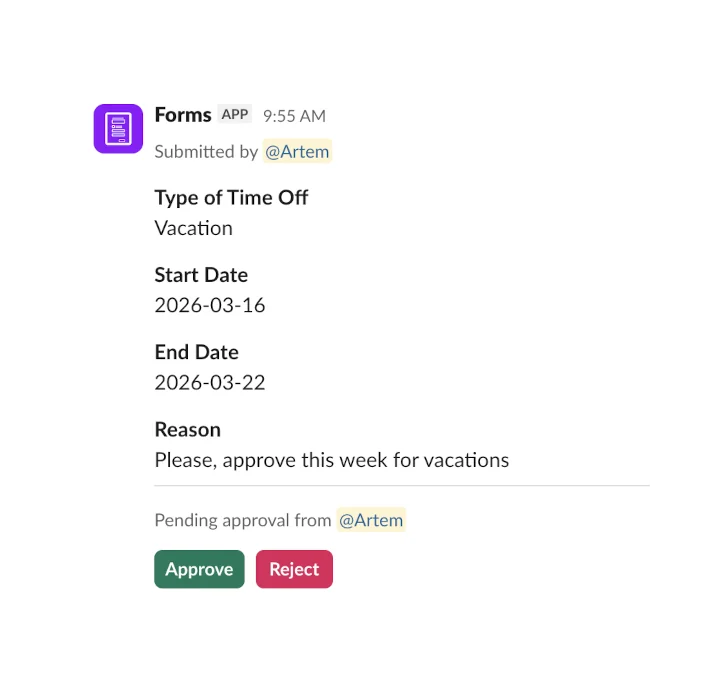
How approvals work
When you create or edit a form, you can enable an approval step and assign one or more approvers. Here's what happens when someone submits the form:
- A team member fills out and submits the form in Slack.
- The assigned approver receives a notification with all the submitted details.
- The approver clicks Approve or Reject — right in Slack.
- The submitter is notified of the decision automatically.
Use cases
Approval workflows are useful whenever a submission needs to be reviewed before it's acted on. Common examples include:
- Time-off requests — employees submit a request, managers approve or reject
- Expense reports — finance reviews submitted expenses before processing
- Purchase orders — team leads approve purchases before they're placed
- Access requests — IT approves access to tools, systems or repositories
- Content approvals — marketing reviews drafts before publishing
- Event registrations — organizers approve or waitlist attendees
- Project proposals — stakeholders review and greenlight new initiatives
Setting up an approval
Open the form editor using /form create or by editing an existing form. In the form settings, enable the approval step and select the Slack user or channel that should receive approval requests. That's it — every new submission will go through the approval flow automatically.
Using approvals in private channels
If your form is assigned to a private channel, you need to add the Forms bot to that channel first. Without this, form submissions and approver notifications won't be delivered.
To add Forms to a private channel, type /invite @Forms in the channel. Once added, approvals will work as expected.
Works with everything else
Approvals work alongside all other Forms features. Combine them with 180+ ready-made templates, channel assignments, keywords, and Zapier integrations to build complete workflows — all within Slack.