180+ Ready-Made Form Templates
Forms for Slack comes with a built-in template library so you can get started immediately — no need to build forms from scratch.
How it works
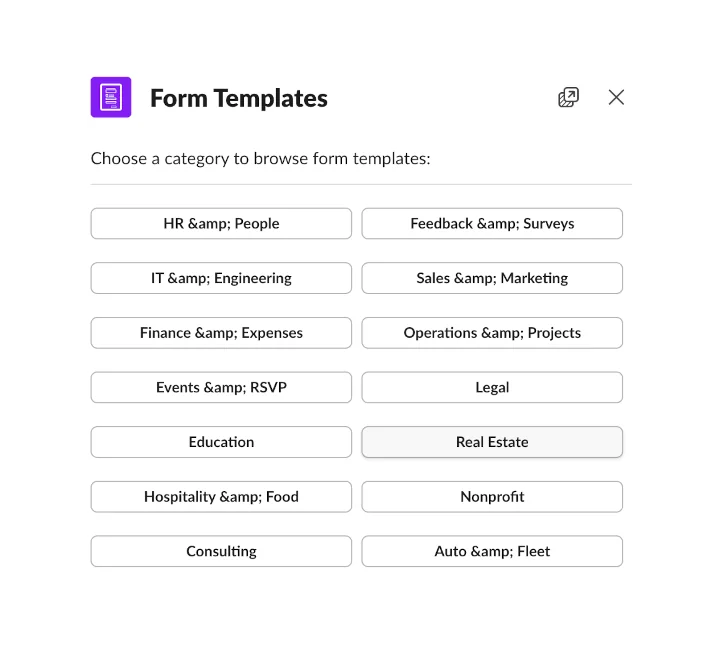
Open the template browser by typing /form templates in any Slack channel or by clicking "Browse Templates" in the Forms home tab. You'll see categories organized by department and industry:
- HR & People — onboarding, time-off requests, performance reviews
- IT & Engineering — bug reports, access requests, incident reports
- Finance & Expenses — expense reports, purchase orders, budget requests
- Operations & Projects — status updates, change requests, project briefs
- Feedback & Surveys — team feedback, NPS surveys, event feedback
- Sales & Marketing — lead capture, campaign briefs, client onboarding
- Events & RSVP — event registration, RSVPs, volunteer sign-ups
- Legal — contract requests, compliance checklists
- Education — course evaluations, student registrations
- Real Estate — showing requests, rental applications, open house sign-ins
- Hospitality & Food — reservation requests, catering orders
- Nonprofit — donation tracking, grant applications, volunteer coordination
- Consulting — client intake, project status updates
- Auto & Fleet — vehicle requests, mileage reports, maintenance logs
Customize to fit your workflow
Every template is fully editable. Pick a template, then add, remove or rearrange fields using the built-in form editor. Change the title, adjust field labels, add dropdown options — make it yours. Once you're happy, assign it to a channel or keyword and your team can start using it right away.
Getting started
Type /form templates in Slack to open the template browser. Pick a category, choose a template and click "Use this template". The form is added to your workspace instantly.
Want to see specific examples? Check out our form examples directory with templates organized by industry.